 Week Tally
Chrome extension for Google Calendar™
Know how many hours your week really holds.
Week Tally adds up the events on your Google Calendar, grouped by color, client or project, in a small panel right inside Calendar. No sign-in, no syncing, nothing uploaded.
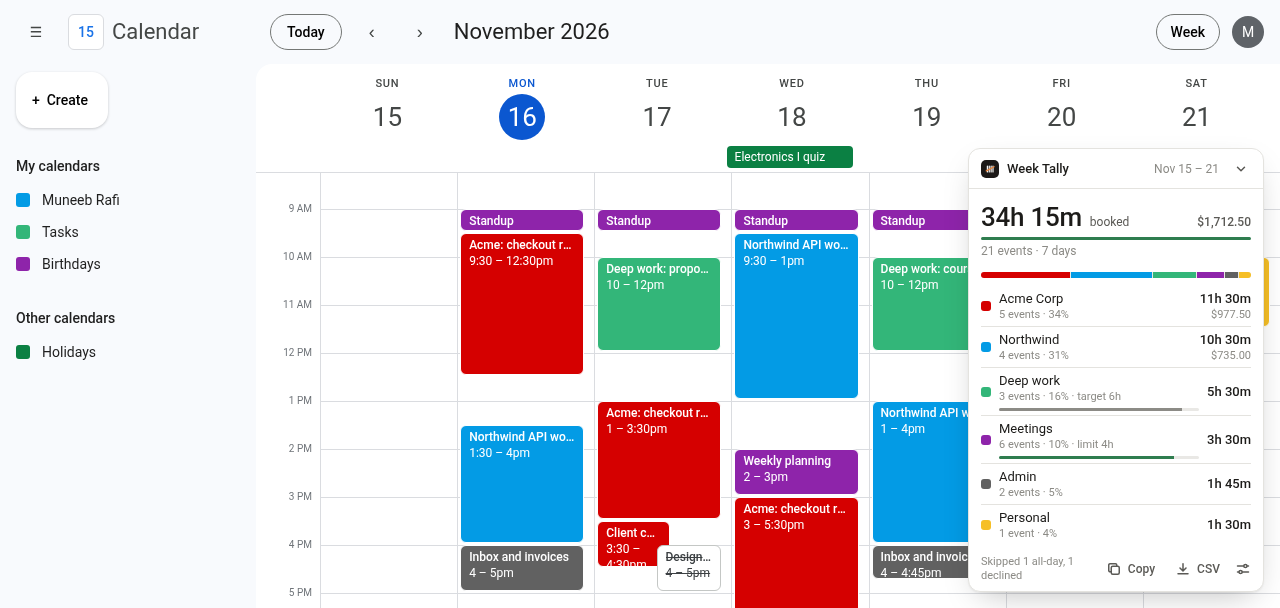
The time-breakdown Google keeps for business plans, in any calendar.
Google’s own Time Insights only appear on some paid Workspace editions. Week Tally works on personal Gmail calendars too, and goes further for freelancers and consultants.
Hours per color
Every timed event on screen is added up by its color, for any day, week or custom range. Move between weeks and it follows.
Honest totals
All-day events and declined invites are left out. Overlaps can count once. Hours show as 7h 30m or 7.5 h.
Timesheets
On Pro, download a CSV with date, start, end, hours, client, title, rate and amount. It opens in Excel, Numbers and Sheets.
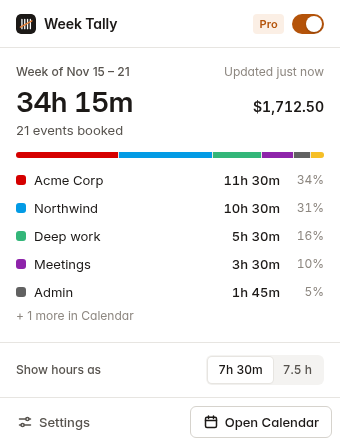
- Colors become clientsName Tomato “Acme Corp” and Peacock “Northwind”, add hourly rates, and the panel shows billable totals per client.
- Targets and limitsAt least 10 hours of deep work, no more than 4 hours of meetings. Progress shows under each group.
- Private by designWeek Tally reads only what Calendar already shows on screen, in your browser. It never connects to your Google account.
Free for weekly totals. Pro when your hours are billable.
Pro is billed through Whop. Both plans start with 14 days free and you can cancel anytime.
Free
$0
Forever
- Hours per color for any view
- Skip declined and all-day events
- Overlaps counted once, decimal hours
- Copy totals as text
Pro monthly
$5 / month
14 days free
- Name colors as clients or projects
- Hourly rates and billable totals
- Title rules, targets and limits
- Timesheet CSV and weekly history
Pro yearly 3 months free
$45 / year
14 days free · $3.75 a month
- Everything in Pro monthly
- One payment a year
- Cancel anytime in Whop
- Up to 3 browsers
After checkout your license key appears in your Whop orders. Paste it into Week Tally → Settings → Plan. How to activate
Questions
Which views does it count?
Day, Week and custom multi-day views, where events have start and end times. In Month, Year and Schedule view the panel offers a one-click switch to Week view.
Does it work with several calendars?
Yes. It counts whatever is visible on screen, so turn calendars on or off in Google Calendar’s sidebar to include or exclude them.
What permissions does it need?
Only storage and access to calendar.google.com. There is no Google sign-in and no Calendar API access, so your events never leave your browser.
How do I cancel?
Open your Whop orders, choose Week Tally Pro and cancel. Pro stays on until the end of the period you paid for.
Can I use one license on several computers?
Yes, on up to 3 browsers. To move it, remove the key in Settings → Plan on the old browser first.